A Klaviyo flow is an automated sequence that sends on its own when a trigger fires, such as an order, a signup, an abandoned cart or a date. Campaigns go to a list when you’ve decided. Flows go to one person at the moment something happens to them.
Every flow you could possibly build answers two questions: what did they just do, and how many times have they bought. Those two questions are the axes of a grid. The first decides when you send. The second decides what you say.
Most guides hand you a list of fifteen flows. A list can’t tell you what you’re missing, because it has no axes. The grid can, and that’s the whole point of this page.
See what your Klaviyo account is leaving on the table.
Request a free Klaviyo auditWhich Klaviyo flows should you build?
Wrong question, and it’s the reason every answer you’ve read is interchangeable. “Which flows” produces a list. The useful question is which cells you’ve covered.
Put the touchpoints down one axis and lifecycle depth across the other:
| Non-customer | Order 1 to 2 | Order 2 to 3 | Order N to N+ | |
|---|---|---|---|---|
| Added to cart | First objection | Reorder friction | Habit forming | Why not subscribe |
One touchpoint, four completely different emails. The person who added to cart and has never bought needs their first objection answered. The person on their fourth order doesn’t have an objection, they have a habit, and the thing left to offer them is a subscription.
15 touchpoints times 4 depths is 60 cells. Nobody builds 60 flows, and that’s not the point either. The point is that you can look at the grid, find the cells you have, and see the holes. A list of fifteen will never show you a hole.
What are the touchpoints a customer can actually hit?
Fifteen, for a normal online shopping journey. Each one is something a person does that you can trigger on, and there’s nothing exotic in the list.
| Touchpoint | Typical Klaviyo trigger |
|---|---|
| Signed up to a list | Subscribed to list |
| Opened an email | Opened Email |
| Clicked an email | Clicked Email |
| Active on site | Active on Site |
| Viewed a product | Viewed Product |
| Added to cart | Added to Cart |
| Started checkout | Checkout Started |
| Placed an order or started a subscription | Placed Order, or a platform event |
| Order fulfilled | Fulfilled Order |
| Marked for delivery | A shipping event |
| Shipment delivered | A shipping event |
| Order refunded | Refunded Order |
| Payment failed | A subscription platform event |
| Subscription paused, skipped or delayed | Three separate platform events |
| Subscription canceled | A subscription platform event |
The last three are the ones that go missing. In the accounts we open, payment failure is almost always absent or half-built, and paused, skipped and delayed get treated as one thing when they’re three separate events meaning three different things. Somebody who’s skipped a delivery isn’t canceling. Somebody whose card failed isn’t even unhappy.
The one real exception. Date-triggered flows have no touchpoint. Birthday and anniversary fire off a profile property, not a behavior, so they sit outside the grid instead of inside it. Worth naming, because it’s the first thing a careful reader throws at the frame.
Two that look like exceptions and aren’t: back in stock and price drop seem to be product events, but the touchpoint is the moment the person asked to be told, so they’re in. That’s a behavior, and it fits.
And one that people expect to see here and shouldn’t. Unsubscribing is an event you can detect, but it isn’t a touchpoint you can work, because somebody who has unsubscribed can’t be sent a marketing email at all. The flow that covers this ground is the sunset flow, and it fires on disengagement before the unsubscribe, which is the only moment you can still do something about it.
Which flows does the grid actually give you?
Here’s the list, since that’s what you came for. The difference is where it comes from: every flow below is a cell, or a cell plus a delay, which is why the list ends instead of going on forever. Build it in this order and the account covers the grid.
| Flow | Fires on | What it is for |
|---|---|---|
| Welcome | Signed up to a list | Earn the first order, and use what they told you |
| Email engagement retargeting | Opened or clicked, no visit | They are interested and did not come back |
| Site abandonment | Active on site, no product viewed | The widest and weakest net |
| Browse abandonment | Viewed a product, no cart | Earlier intent than the cart |
| Cart abandonment | Added to cart, no checkout | They chose, then stopped |
| Checkout abandonment | Checkout started, no order | They had already decided. The cheapest revenue in the account |
| Post-purchase | Placed an order | Get the product used, earn the second order |
| Subscriber onboarding | Started a subscription | A different job: survive to the renewal |
| Order confirmation | Placed an order, transactional | Separate from post-purchase, and it goes to everyone |
| Shipping notifications | Fulfilled, in transit, delivered | Three events, and the delivered one is the opening for everything after it |
| Review request | Shipment delivered, plus a delay | Ask once they have actually used it |
| Refund follow-up | Order refunded | Almost nobody builds this one |
| Failed payment | Payment failed | Nobody is unhappy, it is a card. Usually missing entirely |
| Pause, skip and delay | Three separate platform events | None of them is a cancellation, and none should read like one |
| Cancellation save | Subscription canceled | Answer the stated reason instead of discounting blindly |
That’s the fifteen touchpoint flows. The time axis adds four more that use the same rows with a much longer delay:
| Flow | Fires on | What it is for |
|---|---|---|
| Replenishment | Time since the last order | Arrive when the product is running out |
| Win-back | No order in 60 to 90 days | Reopen it before it goes cold |
| Hail Mary | Checkout started, 30 days later | The abandonment flow everyone forgets to build |
| Sunset | No engagement in several months | Stop sending before they unsubscribe, and protect everything else you send |
The depth axis adds the VIP flow, triggered when somebody crosses a spend or order-count threshold. The useful version doesn’t offer a discount, it offers access, because by then a discount is the one thing they don’t need.
And outside the grid entirely, the date-triggered pair: birthday and anniversary.
That’s 22 lines, and a few more flows than that once you split pause, skip and delay into the three they really are. It’s a complete set, not a round number somebody stopped at. If a competitor’s list has fifteen, ask which seven they left out and why.
Once those exist, the work stops being “which flow next” and starts being “which of these needs a version written for repeat customers”. That’s the second axis, and it’s where most of the money still is.
Why does the same touchpoint need four different emails?
Because the touchpoint tells you when to send and the depth tells you what to say, and those are different jobs. Swap them and the sequence reads like it’s written for somebody else, because it is.
| Depth | What they have already decided | What the message has to do |
|---|---|---|
| Non-customer to order 1 | Nothing. No commitment at all | Remove the single largest objection |
| Order 1 to 2 | That you were worth one try | Get the product used, then earn the second order |
| Order 2 to 3 | That the first one was not a fluke | Turn a repeat into a routine |
| Order N to N+ | That this is simply what they buy | Protect the habit, and make subscribing the obvious step |
It’s the same axis that drives segmentation, and it’s worth being strict about it: “customer” is not a segment, it’s four of them.
It also explains the one piece of flow advice everybody half-knows. A post-purchase flow should split one-time buyers from subscribers before it sends anything. That split is just this axis applied to one row of the grid. The general case is that every row’s earned one.
How do you write a cell into Klaviyo?
Here’s the idea that makes the rest of the builder make sense. A filter is the cell’s coordinates, written out. The trigger picks the row. The filters pin the column and keep every other cell out, and that’s all they’re ever doing.
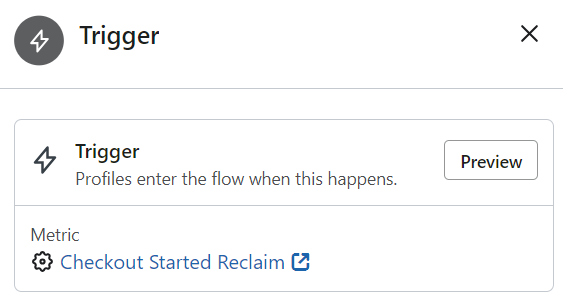
Klaviyo gives you four tools and they don’t all get evaluated at the same moment. This is the most misunderstood table in the product:
| Tool | What it looks at | When Klaviyo evaluates it |
|---|---|---|
| Trigger filter, metric-based | The triggering event | Only when the profile first enters |
| Trigger filter, custom object | The triggering object | At every step |
| Profile filter | The person, now | At entry, and before every email |
| Re-entry criteria | Whether they may come back | Only on organic entry |
Klaviyo’s documentation is explicit: profile filters are applied when people enter a flow, as well as before every email in the flow is sent, so only people who still qualify keep moving through it.
So the rule is simple. If a condition can change while the sequence runs, it belongs in a profile filter, where it gets rechecked. If it describes whether the triggering event qualified, it belongs in a trigger filter. Put a changeable condition in a trigger filter and people stay in the wrong cell for the rest of the run. That’s the most common flow bug we find, by a distance.
One object, three names
This trips up more people than it should. The flow builder calls it a profile filter. The skipped-recipient report calls it Fails Flow Filters. The official glossary calls it a flow filter. They’re the same thing. If you’ve been searching for the difference between a profile filter and a flow filter, there isn’t one.
Trigger split or conditional split?
Same distinction, one layer down. A trigger split branches on a characteristic of the event that started the flow. A conditional split branches on the person’s properties or activity as they stand now. Row versus column again.
And a technique worth stealing. Add a conditional split even when the profile filter already handles it. It changes nothing about who gets what, and that isn’t the point. The branch counts in the flow report tell you at which step people change state, which the filter alone will never show you. A split is a measuring instrument as well as a control, and most people don’t ever use it as anything else.
What does a real entry filter look like?
People ask to see a finished one more than they ask anything else, so here’s the shape of a cart-abandonment entry filter from an account we run. It carries fourteen conditions, and the first time you see something like it you assume somebody lost control. They didn’t. Every condition is doing one of five jobs.
| Job | The condition, in plain terms |
|---|---|
| Pin the column | Has never placed an order |
| Pin the row | Has never reached checkout, so the checkout flow owns those people and this one does not |
| Recency guard | Has not ordered in the last 20 days |
| Recency guard | Is not currently an active subscriber |
| Collision guard | Has not been emailed by the checkout flow in the last 14 days |
| Collision guard | Has not been tagged by either post-purchase flow |
| Collision guard | Profile is more than a day old, so the welcome series goes first |
| Consent | Has not opted out of that message preference |
Read it as coordinates and it isn’t complicated. Two conditions say “this cell”. The rest say “not that cell”. Fourteen conditions is what it costs to keep one cell clean once an account has covered most of the grid.
Why do your flows collide, and how do you stop it?
The moment you cover more than a few cells, one person starts qualifying for several at once. Somebody browses, adds to cart, starts checkout and abandons inside ten minutes. They’ve hit three touchpoints, and if three flows are live they’re getting three sequences about the same shopping trip.
Most people meet this as a symptom rather than a cause, and don’t connect the two: duplicate emails, a pile of skipped messages, or a customer complaining they got four emails in a day.
The three mechanisms that actually work
- Mutual exclusion in the entry filter. Each flow excludes the touchpoints downstream of it. The cart flow excludes anyone who reached checkout, the browse flow excludes anyone who added to cart, and the person lands in exactly one.
- A suppression window. “Has not received an email from this other flow in the last 14 days”, as an entry condition. The account above runs 14 day windows between the abandonment flows and 30 day windows against the slower ones.
- Exit checks before each send. Because profile filters are rechecked before every email, a condition like “still has not ordered” quietly removes people mid-sequence without you building anything.
There’s a fourth thing people reach for and it’s the wrong tool. Smart Sending skips anyone who got another message recently, which looks like collision control and isn’t. It’s a blunt frequency cap applied after the fact, it drops messages you wanted sent, and it tells you nothing about why. What Smart Sending is doing to your flows goes through which messages to turn it off for.
How long after the touchpoint should you send?
Short gaps while the person’s situation is changing, longer gaps once it’s settled. The spacing should track the customer, not the calendar. An email every three days forever is a schedule, not a sequence.
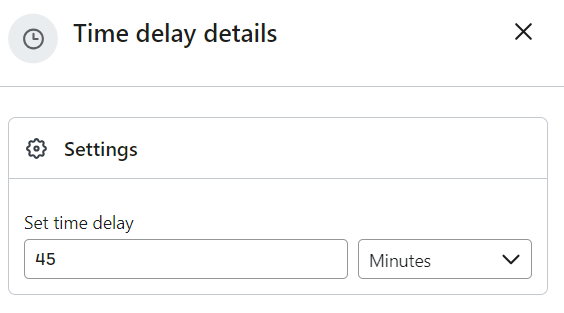
| Where in the sequence | Typical gap | What changed for the customer |
|---|---|---|
| First message | Minutes | They are still there, still thinking about it |
| Same day | Hours | Something is confirmed, nothing has happened yet |
| Early | 2 to 3 days | Shipping, delivery, first use |
| Middle | 4 to 5 days | They are forming an opinion |
| Late | 2 weeks or more | They know whether they like it |
The third axis almost nobody uses
You can trigger on a touchpoint happening. You can also trigger on how long it’s been since a touchpoint happened, and that turns one cell into several.
Everybody’s already doing this in one place. No order in 60 days is a win-back and nobody finds it surprising. What they miss is that the same move works on every other row.
Take checkout started. Somebody abandons, goes through your checkout sequence, and doesn’t convert. Thirty days later you send one more email. We call it the Hail Mary. Same cell, same person, a delay long enough that the original sequence is forgotten and the message reads as new rather than as nagging.
That also settles a question which comes up constantly: is there any reason to run three abandonment flows at once? Yes, if they sit at different distances from the touchpoint. No, if they’re three copies of the same sequence fighting over the same fourteen hours.
When to let Klaviyo pick the delay
For replenishment you can trigger off Klaviyo’s predicted next order date instead of a fixed offset, but only once the account has enough history behind it. The prediction doesn’t appear until four conditions are met:
| Requirement | Why it exists |
|---|---|
| At least 500 customers have placed an order | Customers, not profiles, and the orders must be non-zero and not refunded |
| An ecommerce integration, or orders sent through the API | It needs structured order data, not just events |
| At least 180 days of order history, with orders in the last 30 | Long enough to see a cycle, recent enough that it is still true |
| Some customers with 3 or more orders | Two orders is a coincidence. Three is starting to be a rhythm |
Expected date of next order works the same way: Klaviyo reads that customer’s own ordering pattern first and falls back to how the rest of your customers behave when there isn’t enough history. On a thin account the prediction is really a statement about your average customer. The conditions are in Klaviyo’s predictive analytics documentation. Until you clear them, use a fixed offset from the last order.
How many emails should a flow have?
This is the most-asked question about flows and the honest answer is that it’s the wrong unit. Here’s what a fully built grid looks like from the inside, in one subscription account we run:
| Flow | Messages built | Messages that reach one person |
|---|---|---|
| Welcome series | 47 | 4 |
| Post-purchase, one-time buyer | 82 emails and 13 SMS | 13 to 14 emails, 1 to 3 SMS |
| Order confirmation | 62, across 62 paths | 1 |
| Cancellation save | 27 | 1 to 6 |
Forty-seven emails so that the four you get are right. Sixty-two order confirmations so one person gets the one matching what they bought and what happens to it next.
A flow is a library plus a router, not a sequence. Once you see it that way, “how many emails should a welcome flow have” stops being answerable in the abstract, and a fourteen-condition entry filter stops looking like somebody lost control.
The same account runs 157 flows in total: 59 live, 8 on manual and 90 sitting in draft. 21 of the live ones send no messages at all, because their only job is to write a profile property the sending flows read. Keeping that tagging layer separate is what stops the sending flows turning into one unreadable flow with forty splits in it.
That isn’t a recommendation to build 157 flows. It’s what the top of the range looks like, so you can see where your own account’s sitting on it.
Which cells should you build first?
This part is judgment, not data. It comes from what we find broken when we open accounts, not from published revenue by flow, and anyone handing you this list as a ranking of earnings is guessing with more confidence than the evidence supports.
| Order | Cell | Why it goes here |
|---|---|---|
| 1 | Signed up, non-customer | The most volume, and the only moment they told you what they want |
| 2 | Started checkout, non-customer | They had already chosen. The cheapest revenue in the account |
| 3 | Placed order, order 1 to 2 | The gap where most brands lose the customer they just paid for |
| 4 | Payment failed, any depth | Nobody is unhappy, it is a card. Usually missing entirely |
| 5 | Subscription canceled, any depth | A stated reason you can answer, instead of a blanket discount |
| 6 | Added to cart, non-customer | Earlier intent, lower conversion, still worth it |
After those six, stop adding rows and start filling columns. You’ve got the hard part done. A second message written for people on their third order will nearly always beat a seventh flow written for nobody in particular.
What does a Klaviyo flow audit check?
When we open an account the flow review runs in a fixed order, because the early items change what the later ones mean. Here’s the order we use.
| Check | What usually turns up |
|---|---|
| Coverage against the grid | Four or five cells covered out of sixty-four, and rarely the same four |
| Filters, trigger versus profile | Changeable conditions in trigger filters, so people are stuck in the wrong cell |
| Collisions | Two or three flows firing on one person in the same hour |
| Smart Sending | Left on for time-sensitive flows, silently dropping messages |
| Delays | An even cadence nobody chose, usually the default |
| Holdouts | None anywhere, so nothing in the account has ever been measured |
| Consent and suppression | Flows sending to profiles that should never be mailable |
Most of it’s findable in an afternoon by somebody who knows where to look, and most of it’s been quietly costing money for a year. If you’d rather somebody else went through it, our Klaviyo audit says what to fix first and what it’s worth.
What should you read next?
- Your flow is live and nothing is happening, which is a different problem with its own checklist.
- The post-purchase flow in full, one row of the grid worked all the way through.
- The welcome flow, and the one question worth asking at signup.
- What Smart Sending is doing to your flows, and how to see what it has already cost.
- How lifetime value is actually built, which is what a flow program moves in the end.
Frequently asked questions
What is a Klaviyo flow?
A Klaviyo flow is an automated sequence that sends when a trigger fires, such as an order, a signup, an abandoned cart or a date. Unlike a campaign, which goes to a list at a time you choose, a flow reaches one person at the moment something has happened to them.
Which Klaviyo flows should I build first?
Welcome, checkout abandonment, post-purchase, failed payment, cancellation save and cart abandonment, in that order. After those six it is usually better to write a second version of an existing flow for repeat customers than to add a seventh flow.
How many emails should a Klaviyo flow have?
It depends on how many branches it carries, which is why the question rarely has a useful answer. In one account we run, the welcome series holds 47 emails and any single person receives 4 of them. Count the messages one person gets, not the messages you built.
What is the difference between a profile filter and a flow filter in Klaviyo?
There is none. They are the same object under different names: the flow builder calls it a profile filter, the skipped-recipient report calls it Fails Flow Filters, and the official glossary calls it a flow filter.
What is the difference between a trigger filter and a profile filter?
A metric-based trigger filter is evaluated only when the profile first enters the flow, and looks at the triggering event. A profile filter is evaluated at entry and again before every email, and looks at the person as they are now. Conditions that can change while the flow runs belong in a profile filter.
What is the difference between a trigger split and a conditional split?
A trigger split branches on a characteristic of the event that started the flow. A conditional split branches on the person’s properties or activity as they stand at that point in the sequence.
How do I stop two Klaviyo flows sending to the same person?
Exclude the downstream touchpoints in each flow’s entry filter so the flows are mutually exclusive, then add a suppression window such as “has not received an email from this other flow in the last 14 days”. Smart Sending is a frequency cap, not collision control.
Is there any reason to run more than one abandoned cart flow?
Yes, if they sit at different distances from the touchpoint. A sequence in the first hours and a single message 30 days later do different jobs. Running two copies of the same sequence across the same few hours does not.
Sources
- Klaviyo, Understanding flow triggers and filters
- Klaviyo, Flow glossary
- Klaviyo, Understanding predictive analytics
- Klaviyo, Understanding Smart Sending
Flow architecture described here is drawn from live subscription accounts we run. No client, product, category or platform is identified, and no account data is published beyond the structural counts above.